
DSA Full Form in Programming: Data Structures and Algorithms Explained
In the world of software development, computer science, and technical interviews, one acronym dominates the landscape: DSA.
Whether you are a university student taking your first steps into coding, a self-taught programmer building web applications, or an experienced engineer aiming for a role at tech giants like Google, Meta, or Amazon, DSA forms the bedrock of your engineering capabilities.
But what exactly does DSA stand for, why does it carry such immense weight in the tech ecosystem, and how can you master it from scratch?
This comprehensive guide breaks down the core concepts of Data Structures and Algorithms (DSA), explores their practical importance, details the primary types of data structures and algorithms, and provides an actionable, step-by-step roadmap to mastering them.
1. What is the Full Form of DSA?
The full form of DSA is Data Structures and Algorithms.
At its core, DSA represents the two fundamental pillars of computer programming:
- Data Structures: How we store, organize, and manage data efficiently within a computer’s memory.
- Algorithms: The step-by-step procedures, logic, and instructions used to process that data to solve a specific problem.
To put it in simpler terms, if programming is the art of building a house, Data Structures are the specific construction materials and storage closets you choose to use, while Algorithms are the blueprints, structural engineering formulas, and assembly instructions that dictate how you build it safely and efficiently.
Without data structures, algorithms would have no structured information to operate on. Without algorithms, data structures would remain passive reservoirs of unutilized information. Together, they form the engine that powers every software application, operating system, and digital platform on Earth.
2. Understanding Data Structures
A Data Structure is a specialized format designed to organize, manage, process, and store data in a computer’s memory so that it can be accessed and modified efficiently.
Data is rarely simple. In the real world, data represents complex networks, financial ledgers, user profiles, or physical coordinates. Choosing the wrong data structure can cause a program to run out of memory, crash, or take hours to complete a task that should take milliseconds.
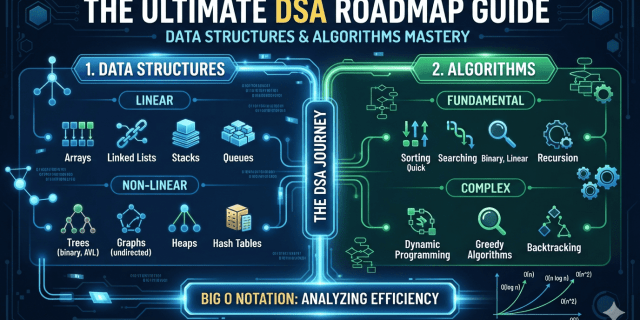
Data structures are broadly divided into two major categories: Linear Data Structures and Non-Linear Data Structures.
Linear Data Structures
In linear data structures, elements are arranged sequentially or linearly. Each element is directly connected to its previous and next elements, making them relatively straightforward to implement and traverse.
- Arrays: An array is a collection of elements of the same data type stored in contiguous (adjacent) memory locations. It allows for direct, instant access to any element using an index (starting at 0). However, its size is fixed at the time of creation, making insertions and deletions expensive because other elements must be shifted.
- Linked Lists: A linked list consists of a sequence of nodes. Each node contains two parts: the actual data and a pointer (or reference) to the next node in the sequence. Unlike arrays, linked lists do not require contiguous memory and can dynamically grow or shrink. However, accessing an element requires traversing from the beginning (head) of the list.
- Stacks: A stack operates on a Last-In, First-Out (LIFO) principle. Think of a physical stack of plates: you add a new plate to the top, and you remove the top plate first. The primary operations are
push(add) andpop(remove). Stacks are crucial for managing function calls (the call stack) and implementing undo/redo functionality in software. - Queues: A queue operates on a First-In, First-Out (FIFO) principle, resembling a real-world waiting line. The first person to join the line is the first person served. Elements are added at the back (enqueue) and removed from the front (dequeue). Queues are widely used in printer task scheduling and handling web server requests.
Non-Linear Data Structures
In non-linear data structures, data elements are not arranged sequentially. An element can be connected to multiple other elements, forming hierarchical or interconnected relationships.
- Trees: A tree is a hierarchical structure consisting of nodes connected by edges. It features a single top node called the root, and every node (except the root) has a parent node. The most famous variant is the Binary Tree, where each node has at most two children. A specialized version, the Binary Search Tree (BST), maintains sorted data for ultra-fast searching and retrieval.
- Graphs: A graph is a network of nodes (called vertices) connected by lines (called edges). Unlike trees, graphs have no strict hierarchy and can contain cycles (loops). Graphs are used to model complex real-world networks, such as social media friendships (Facebook/LinkedIn networks) or physical maps for navigation systems (Google Maps).
- Heaps: A heap is a specialized tree-based data structure that satisfies the heap property. In a Max-Heap, the root node contains the maximum value, and every child node is smaller than or equal to its parent. In a Min-Heap, the root contains the minimum value. Heaps are the engine behind priority queues and the famous Heapsort algorithm.
- Hashing (Hash Tables): A hash table maps keys to values using a mathematical function called a hash function. It computes an index into an array of buckets or slots, from which the desired value can be found. Hash tables provide near-instantaneous search, insertion, and deletion operations, making them incredibly powerful for data caching and indexing.
3. Understanding Algorithms
An Algorithm is a well-defined, step-by-step computational procedure that takes some value (or set of values) as an input and produces some value (or set of values) as an output. In short, it is a recipe for solving a problem.
An algorithm must possess several core characteristics to be effective:
- Finiteness: It must terminate after a limited, predictable number of steps.
- Definiteness: Each step must be precisely defined, leaving no room for ambiguity.
- Input/Output: It must take zero or more inputs and produce at least one defined output.
- Feasibility: It must be practical and capable of executing with available computational resources.
In software engineering, algorithms are categorized based on the specific problems they solve and the design philosophies they employ.
Core Algorithmic Paradigms
- Sorting Algorithms: These algorithms rearrange elements in a specific order (e.g., numerical or alphabetical). Classic examples include Bubble Sort (simple but slow), Merge Sort and Quicksort (highly efficient, dividing data to conquer it), and Insertion Sort (efficient for small datasets).
- Searching Algorithms: These look for a specific target element within a data structure. Linear Search checks every element sequentially, while Binary Search divides a sorted dataset in half repeatedly, locating items at blazing speeds.
- Recursion: A programming technique where a function calls itself to break down a large problem into smaller, identical sub-problems. It serves as the foundation for navigating complex structures like trees and graphs.
- Divide and Conquer: This strategy breaks a massive problem into independent sub-problems, solves the sub-problems recursively, and combines their results to solve the original issue. Merge Sort and Quick Select rely heavily on this.
- Greedy Algorithms: These algorithms make the locally optimal choice at each step, hoping that these local choices will accumulate into a globally optimal solution. Examples include Dijkstra’s Algorithm for finding the shortest paths on a map and fractional knapsack problems.
- Dynamic Programming (DP): DP solves complex problems by breaking them down into overlapping sub-problems. It solves each sub-problem exactly once and stores its answer in a table (memoization or tabulation) to avoid redundant computations. It is the ultimate tool for optimization problems.
- Backtracking: A systematic algorithmic strategy that searches for a solution by exploring all potential paths. If a path leads to a dead end, the algorithm “backtracks” to the previous step and tries a different route. It is famously used to solve puzzles like Sudoku, mazes, and the N-Queens problem.
4. Measuring Performance: Big O Notation
How do computer scientists determine if one algorithm is “better” than another? They do not rely on a stopwatch, because a program’s running time varies wildly depending on whether it is executed on a cheap smartphone or a multi-million-dollar supercomputer.
Instead, engineers use Time Complexity and Space Complexity, mathematically expressed through Big O Notation.
Big O Notation measures how the execution time or memory storage of an algorithm grows asymptotically as the size of the input data ($n$) increases toward infinity.
| Big O Notation | Name | Growth Characteristics & Examples |
|---|---|---|
| $O(1)$ | Constant Time | Performance remains identical regardless of data size. Example: Accessing an element in an array by index. |
| $O(\log n)$ | Logarithmic Time | Time grows linearly while the data size grows exponentially. Incredibly fast. Example: Binary Search. |
| $O(n)$ | Linear Time | Execution time scales one-to-one with the input size. Example: Scanning a list for an item via Linear Search. |
| $O(n \log n)$ | Linearithmic Time | Commonly found in highly efficient sorting routines that divide datasets. Example: Merge Sort, Quicksort. |
| $O(n^2)$ | Quadratic Time | Execution time grows quadratically. Double loops over a dataset. Avoid for large scale data. Example: Bubble Sort. |
| $O(2^n)$ | Exponential Time | Execution times double with every single added data point. Highly inefficient. Example: Naive Fibonacci sequence recursion. |
When writing production-grade software, minimizing Time and Space Complexity ensures your platform scales gracefully to accommodate millions of concurrent global users.
5. Why DSA is Crucial for Programmers
Many self-taught developers ask: “I build websites using React, Node.js, or Django, and they work perfectly fine. Why should I spend months learning abstract concepts like Graphs, Stacks, or Dynamic Programming?”
While you do not explicitly write data structures from scratch in everyday web development (since modern languages provide native array and object implementations), understanding DSA transforms you from a coder who simply writes syntax into a true software engineer who crafts robust software architectures.
Optimized Code Efficiency and Resource Management
Computers are fast, but they do not have infinite processing power or memory. When an application scales from 100 users to 100 million users, inefficient code collapses.
- If you search for a user ID using a linear search ($O(n)$) on a database of 50 million citizens, your server might stall for several seconds.
- If you leverage a Hash Map or a Binary Search Tree ($O(1)$ or $O(\log n)$), the retrieval happens instantly.
DSA teaches you how to save server costs, lower CPU utilization, and optimize memory footprints.
Advanced Problem-Solving Frameworks
DSA teaches you structural mental frameworks. When you run into a highly complex business logic problem, your mind will instantly map it to abstract archetypes.
- Need to model an airline route with connecting flights and fluctuating prices? You will recognize it as a Weighted, Directed Graph and apply Dijkstra’s Algorithm.
- Need to build an intricate multi-tier organizational approval workflow? You will model it as a Tree.
DSA equips you with a mental toolbox full of pre-tested, historically validated engineering solutions.
Cracking the Technical Interview Gatekeepers
The reality of the modern tech job market is that top-tier companies—including Google, Apple, Microsoft, Amazon, Netflix, Uber, and high-growth scale-ups—rely extensively on DSA coding rounds to evaluate engineering talent.
They use DSA problems because syntax can be learned in a weekend, but core computational thinking, algorithmic efficiency analysis, and problem-solving skills take months of rigorous practice to develop. Excelling at DSA is your passport to high-paying software jobs worldwide.
Deep Understanding of Modern Software Internals
Have you ever wondered how databases index tables to fetch data in milliseconds? They use B-Trees and LSM Trees. How does your web browser’s history mechanism handle the “Back” button? It uses a Stack. How does a routing engine direct data packets across the internet? It uses graph traversal algorithms.
Learning DSA pulls back the curtain on how complex software tools operate under the hood, enabling you to use them more effectively.
6. How to Learn DSA Step-by-Step
Mastering Data Structures and Algorithms can feel incredibly overwhelming. Many beginners jump straight into solving hard questions on platforms like LeetCode or HackerRank without establishing core foundations, leading to frustration, burnout, and imposter syndrome.
To learn DSA successfully, you must follow a structured, evolutionary path. Below is a definitive, battle-tested learning roadmap.
Step 1: Master a Single Programming Language
Do not try to learn DSA while simultaneously trying to learn a brand-new programming language. Pick one object-oriented or structured language and understand its memory model, syntax, collections framework, and pointer/reference behavior deeply.
Excellent choices include:
- C++: Renowned for speed and explicit memory control via pointers. Highly favored in competitive programming.
- Java: Offers strong typing, structured collection libraries, and automatic garbage collection. Extensively used in corporate enterprise settings.
- Python: Clean, elegant syntax that lets you focus purely on logic rather than boilerplate code. Excellent for fast prototyping.
Stick to your chosen language throughout your entire DSA journey.
Step 2: Grasp Time and Space Complexity Foundations
Before writing a single algorithm, you must learn how to read and calculate Big O Notation.
- Learn how to identify constant, linear, logarithmic, and quadratic code patterns.
- Understand the difference between Worst-case, Best-case, and Average-case scenarios.
- Train your eyes to inspect nested loops, recursive branches, and auxiliary allocations so you can immediately gauge code efficiency.
Step 3: Build Linear Data Structures from Scratch
Do not just use built-in arrays or lists. Write them yourself to truly understand how they manage memory allocations.
- Implement a dynamic array structure.
- Write a singly and doubly linked list class. Build insert, delete, and reverse functions.
- Construct custom Stacks and Queues using both arrays and linked lists.
- Solve simple string manipulation and array manipulation problems to build confidence.
Step 4: Explore Basic Sorting and Searching Algorithms
Learn how to organize and look up data:
- Write standard linear searches and binary searches. Understand why binary searching requires pre-sorted arrays.
- Implement Bubble Sort, Selection Sort, and Insertion Sort to understand $O(n^2)$ behavior.
- Move on to advanced divide-and-conquer sorting mechanisms: Merge Sort and Quicksort.
Step 5: Conquer Recursion
Recursion is the mental stumbling block for many programmers.
- Understand the mechanics of the computer call stack.
- Learn how to design a mandatory Base Case to prevent infinite loops (stack overflows).
- Practice writing recursive solutions for mathematical sequences (Factorials, Fibonacci numbers) and string reversals before leveraging recursion on structural data elements.
Step 6: Transition to Non-Linear Hierarchical Data Structures
Once your linear fundamentals and recursive thinking are concrete, tackle non-linear spaces:
- Trees: Master Binary Trees and Binary Search Trees (BST). Practice structural operations like Tree Inorder, Preorder, and Postorder traversals. Learn how to look up, insert, and delete items in a BST.
- Heaps: Learn how a binary heap maintains order. Implement a Priority Queue.
- Hashing: Understand hash collisions, chaining, open addressing, and how hash functions preserve immediate key-value lookup.
Step 7: Dive Deep into Complex Graph Analytics
Graphs are highly versatile but require rigorous study:
- Learn how to represent graphs using Adjacency Matrices and Adjacency Lists.
- Master the two core graph exploration algorithms: Breadth-First Search (BFS) and Depth-First Search (DFS).
- Study pathfinding optimization rules like Dijkstra’s Shortest Path Algorithm and Minimum Spanning Trees (Kruskal’s or Prim’s algorithms).
Step 8: Master Advanced Algorithmic Paradigms
Complete your educational journey by focusing on complex optimization models:
- Backtracking: Solve the classic maze configurations and string permutation distributions.
- Dynamic Programming: Overcome the fear of DP by mastering the art of breaking down problems. Learn to identify overlapping sub-problems, write recursive structures, apply Memoization (Top-Down approach), and finally convert them into Tabulation models (Bottom-Up approach). Start with standard problems like the Knapsack Problem, Longest Common Subsequence, and Coin Change.
7. Practical Tips to Retain and Excel at DSA
Learning DSA is a marathon, not a sprint. Reading code from a textbook or watching someone write algorithms on a screen provides a false sense of security. To retain these concepts, you must engage in active, consistent coding practice.
Avoid the Memorization Trap
Never memorize code blocks or algorithmic implementations line by line. Interviewers routinely modify classic problems to test your adaptability. Focus on the core mechanics instead: understand why a pointer moves, why a particular condition breaks a loop, or how data is structured across memory boundaries.
Leverage the Breadth-Over-Depth Strategy
When beginning your practice on online judges, do not solve 50 consecutive array questions while ignoring graphs and trees completely. Instead, solve 5 to 10 foundational questions across arrays, strings, linked lists, and stacks, then rotate systematically through trees, graphs, and dynamic programming. A broad, well-rounded grasp of all structures is far more valuable than hyper-specialization in just one.
Leverage a Consistent Practice Framework
Utilize structured, gamified problem-solving platforms to maintain consistency:
- LeetCode: The industry standard for technical interview preparation, offering a massive array of categorized algorithmic problems.
- HackerRank / CodeChef: Excellent platforms for foundational language assessments and regular competitive coding challenges.
- GeeksforGeeks: A vast library filled with deep explanations, structural pseudocode, and coding challenge sandboxes.
Aim to solve 1 or 2 targeted problems every single day rather than attempting 15 problems in a chaotic, exhausting weekend sprint.
Read and Critique Alternative Code Solutions
Once you successfully pass all test cases for a problem, do not immediately rush to the next challenge. Click on the “Discussion” or “Solutions” tab.
Analyze how top engineers solved the exact same problem. You will frequently find highly optimized approaches, clever language tricks, or unique space-saving techniques that will broaden your engineering horizons.
8. Summary of Key Concepts
To keep your learning track aligned, reference this conceptual summary of core elements:
- DSA = Data Structures (Storage/Organization) + Algorithms (Procedural Execution Logic).
- Arrays & Linked Lists are primary storage buffers. Arrays are fast to read but fixed in size; Linked Lists are dynamic but slower to traverse.
- Stacks (LIFO) and Queues (FIFO) act as sequential runtime controllers.
- Hash Tables trade memory space for lightning-fast, constant-time ($O(1)$) data lookups.
- Trees & Graphs map complex, multi-tiered relationships, requiring recursive traversals (DFS/BFS).
- Big O Notation serves as the universal mathematical benchmark evaluating runtime performance ($Time$) and memory allocations ($Space$).
Mastering Data Structures and Algorithms requires time, immense patience, and consistent practice. By treating DSA as an incremental journey rather than a chore to bypass interviews, you develop the computational thinking skills necessary to design efficient, scalable, and elegant software systems that stand the test of time.
Frequently asked questions (FAQs) about Data Structures and Algorithms:
General & Foundational Questions
How long does it take to learn DSA from scratch?
For a complete beginner, it typically takes 3 to 6 months of consistent practice (about 1–2 hours a day) to build a solid foundation.
- Months 1–2: Mastering a programming language and learning basic linear data structures.
- Months 3–4: Exploring trees, graphs, and basic sorting/searching algorithms.
- Months 5–6: Practicing advanced problem-solving paradigms like dynamic programming and prepping for interviews.
Can I learn DSA without knowing a programming language?
No. Algorithms are structural logical concepts, but you need a programming language to write, execute, and test them. You should have a strong grasp of fundamentals (loops, conditionals, functions, and object-oriented concepts) in at least one language before diving into DSA.
Is DSA only useful for passing interviews?
No. While it is heavily tested in interviews, DSA fundamentally changes how you write code. It teaches you how to write optimized, resource-efficient code that can scale to millions of users, directly impacting real-world software performance, database management, and server costs.
Language & Implementation Questions
Which programming language is best for DSA?
There is no single “best” language, but the three most popular choices are:
- C++: Highly preferred for competitive programming due to its blazing execution speed and Standard Template Library (STL).
- Java: Great for enterprise developers, offering a robust Built-in Collections Framework and clear object-oriented structure.
- Python: Perfect for fast prototyping due to its clean, highly readable syntax, allowing you to focus strictly on logic rather than boilerplate code.
Should I switch languages if I see solutions written in another language?
No. Stick to one language throughout your foundational learning. The logic behind an algorithm (like Binary Search or Quick Sort) remains identical whether it is written in Python, Java, or C++. Focus on understanding the logic, then translate it into your language of choice.
Problem-Solving & Interview Strategy
How many LeetCode questions should I solve to be interview-ready?
Quality matters far more than quantity. Instead of chasing a high number, focus on topic coverage. A well-rounded portfolio of 150 to 250 targeted questions (roughly 50% Easy, 40% Medium, 10% Hard) distributed across all major data structures is usually more than enough to clear top-tier technical interviews.
What should I do if I get stuck on a DSA problem?
Getting stuck is a natural part of the learning loop. Follow the 30-minute rule:
- Spend 30 minutes trying to brainstorm, dry-running test cases on paper, and tracing the logic.
- If you are still completely stuck, look at the discussion section or a tutorial.
- Don’t just copy the code. Read the conceptual explanation, close the solution, and try to type out the implementation entirely from scratch by yourself.
What are the most important DSA topics for FAANG/Big Tech interviews?
While you should know the basics of everything, tech giants heavily focus on:
- Arrays, Strings, and Hash Maps (most common)
- Two Pointers and Sliding Window techniques
- Tree and Graph Traversals (BFS and DFS)
- Recursion and Dynamic Programming (often used as differentiator questions for higher-level roles)
DSA, #DataStructures, #Algorithms, #Programming, #CodingInterview, #ComputerScience, #LearnToCode, #SoftwareEngineering, #LeetCode, #TechInterviews


